

Array Methods You Must Know
A beginner-friendly guide to the most useful JavaScript array methods used in modern web development.
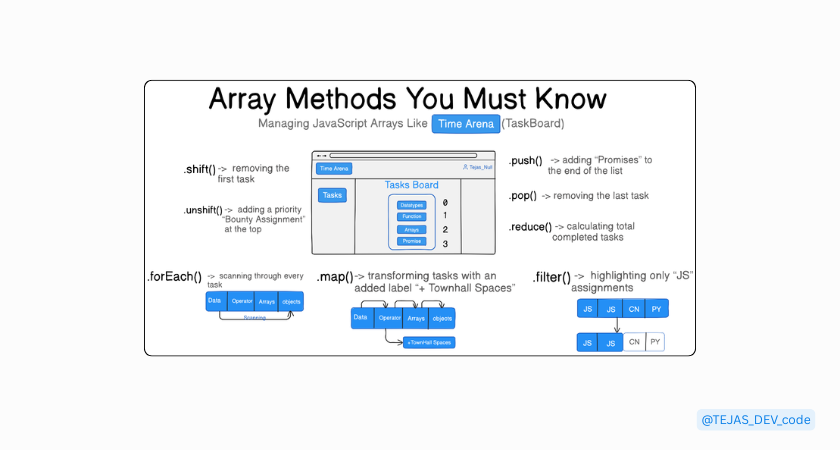
Now imagine you are part of the Web Dev Cohort 2026.
JavaScript classes are going on, and every week Hitesh Sir and Piyush Sir give new assignments. The famous (BigBoss) Anirudh Sir also drops challenges, and in the Thursday T-classes, Akash Sir sometimes adds extra tasks too.
Because of this, assignments keep increasing every week.
To manage all of them, cohort students usually track their tasks using TimeArena (the cohort’s internal tool for managing time and assignments). It works very much like a to-do list.
That list of assignments can be thought of as an array in JavaScript.
let assignments = ["Datatypes", "Operators", "Functions", "Arrays", "Objects", "Promises"];
Think of this array like the homepage of your todo app or the TimeArena TaskBoard where all assignments are listed.
Now, different things keep happening in the cohort every day.
New assignments get added, some tasks get completed, sometimes we filter important tasks, and sometimes we calculate progress.
And this is exactly where array methods become powerful.
a. Push() - A New Assignment Arrives
Imagine this week in the Saturday class, Hitesh Sir gives a new assignment on Promises. Now think about your TimeArena taskboard or to-do list.
Where would you add this new task? Usually at the end of the list, because your previous tasks already have their priority and order.
In JavaScript arrays, we do the same thing using the push() method.
let assignments = ["Datatypes", "Functions", "Arrays"];

assignments.push("Promises");
// Before
["Datatypes", "Functions", "Arrays"]

// After
["Datatypes", "Functions", "Arrays", "Promises"]
So the new assignment “Promises” gets added to the end of the array.
Note:
push()adds a new element to the end of the array, just like adding a new task at the bottom of your to-do list or TimeArena taskboard.
b. pop() - Last assignment gets completed
Imagine you have completed the Promises assignment. Since the task is finished, you remove it from your TimeArena taskboard or todo list.
In JavaScript arrays, removing the last item is done using the pop() method.
let assignments = ["Datatypes", "Functions", "Arrays", "Promises"];

assignments.pop();
// Before
["Datatypes", "Functions", "Arrays", "Promises"]

// After
["Datatypes", "Functions", "Arrays"]
So the last assignment ("Promises") is removed from the list.
Note:
pop()removes the last element of an array, just like removing the last completed task from the bottom of your todo list.
c. unshift() – Bounty assignmet Comes First
Imagine Hitesh Sir gives a special assignment on Promise methods, and this one is a bounty assignment. That means if you complete it first, you might win prize money.
Because of this, it becomes a high-priority task.
Instead of adding it at the bottom of the list, you place it at the top of your todo list so you can work on it first.
In JavaScript arrays, we do this using the unshift() method.
let assignments = ["Datatypes", "Functions", "Arrays"];

assignments.unshift("Promises");
// Before
["Datatypes", "Functions", "Arrays"]

// After
["Promises", "Datatypes", "Functions", "Arrays"]
Now the Promises assignment appears first, because it has higher priority.
Note:
unshift()adds an element to the beginning of the array, just like adding an urgent or high-priority task at the top of your todo list.
d. shift() - first assignmets or to get completed first
Imagine you start your day and complete the first task at the top of your todo list.
Once the task is finished, you remove it from the list.
In JavaScript arrays, removing the first element is done using the shift() method.
let assignments = ["Datatypes", "Functions", "Arrays"];

assignments.shift();
// Before
["Datatypes", "Functions", "Arrays"]

// After
["Functions", "Arrays"]
So the first task "Datatypes" is removed from the list.
Note:
shift()removes the first element of an array, just like removing the top task from your todo list after completing it.
e. forEach() - Check every assignment or todo
Imagine it's the start of your day and you want to check what assignments you need to complete today. Instead of looking at each task manually, you go through the entire list.
In JavaScript, we can do this using the forEach() method, which runs a function for every item in the array.
let assignments = ["Datatypes", "Functions", "Promises"];

assignments.forEach(function(assignment) {
  console.log("Todo: " + assignment);
});
Todo: Datatypes
Todo: Functions
Todo: Promises
This prints every task from the todo list.
Note:
forEach()runs a function once for every element in the array, which makes it useful when you want to process or display each item.
f. map() - transform every assignmets or todo
Imagine that every day you have two tasks:
Complete the assignment
Attend the MasterJi Townhall Spaces (the internal cohort space for discussions)
So every task in your todo list now gets extra work added to it.
For example:
Datatypes → Datatypes + Townhall spaces
Operators → Operators + Townhall spaces
In JavaScript, when we want to transform every element of an array, we use the map() method
let assignments = ["Datatypes", "Functions", "Arrays"];

let updatedAssignments = assignments.map(function(assignment) {
  return assignment + " + Townhall spaces";
});
// Before
["Datatypes", "Functions", "Arrays"]

// After
["Datatypes + Townhall spaces", "Functions + Townhall spaces", "Arrays + Townhall spaces"]
Now each assignment includes attending the Townhall spaces as well.
Note:
map()transforms every element in the array and returns a new array with the updated values.
g. filter() - only certain assignments
Imagine your todo list contains assignments from different topics, like JavaScript and Networking. But today you only want to focus on JavaScript assignments.
Your list looks like this:
// Before
["DNS", "JS - Datatypes", "JS - Functions", "TCP", "CUrl"]
To select only the assignments related to JavaScript, we can use the filter() method.
let assignments = ["DNS", "JS - Datatypes", "JS - Functions", "TCP", "CUrl"];

let jsAssignments = assignments.filter(function(assignment) {
  return assignment.includes("JS");
});
//After
["JS - Datatypes", "JS - Functions"]
Now the new array contains only the JavaScript assignments.
Note:
filter()selects elements from an array that match a specific condition, just like filtering your todo list to show only tasks related to JavaScript.
h. reduce() - Calulate the tasks in the todo list
Imagine it's the end of the day, and you want to check how many assignments you completed today. Instead of counting each task manually, we can calculate the total using JavaScript.
This is where the reduce() method is useful.
let assignments = ["Datatypes", "Operators", "Functions", "Arrays", "Objects", "Promises"];

let totalTasks = assignments.reduce(function(total, assignment) {
  return total + 1;
}, 0);

console.log(totalTasks);
6
Here, reduce() goes through every item in the array and keeps adding 1 to the total count.
So if there are 6 assignments, the final result becomes 6.
Note:
reduce()takes many values from an array and reduces them into a single value, such as a total, sum, or count.
Practice Challenge: Try It Yourself
Question 1: Double the Numbers
Create an array of numbers.
let numbers = [2, 5, 8, 12, 15];
Use map() to create a new array where every number is doubled.
Example idea:
2 → 4
5 → 10
8 → 16
After writing the code, answer:
Did the original array change?
Why does
map()return a new array?
Question 2: Filter Large Numbers
Using the same array:
let numbers = [2, 5, 8, 12, 15];
Use filter() to create a new array that contains only numbers greater than 10.
Expected idea:
[12, 15]
After writing the code, explain:
Why were smaller numbers removed?
What condition did
filter()check?
Question 3: Calculate Total Sum
Using the same array again:
let numbers = [2, 5, 8, 12, 15];
Use reduce() to calculate the total sum of all numbers.
Expected result:
42
After writing the code, explain:
What does the accumulator (
total) represent?Why do we start with
0?
Final Thought
While learning in the cohort and managing assignments on the TimeArena taskboard, I realized array methods work just like managing our daily tasks adding new ones, completing some, checking the list, or focusing only on important tasks.
Using these small real-life examples helped me understand JavaScript concepts much better, and I hope this explanation helps you too.
If it helped you understand arrays a little better, then this cohort assignment from Tejas did its job.
If you'd like to follow my learning journey or share your thoughts, feel free to connect: