

Understanding Network Devices
Exploring the Tools That Connect the Digital World
Why Network Devices Matter
Every click, API call, or AI request starts with a journey through the network. Before your code runs, data passes through multiple network devices that route, control, and protect it.
Without these devices, computers couldn’t communicate, scale, or stay secure. They are invisible but they make everything work.
Network Devices
Repeater → Amplifier
Hub → Broadcaster
Switch → Forwarder
Bridge → Connector
Router → Pathfinder
Multi-layer Switch (Layer 3 Switch) → Hybrid
Brouter → Chooser
Modem → Translator
Firewall → Gatekeeper
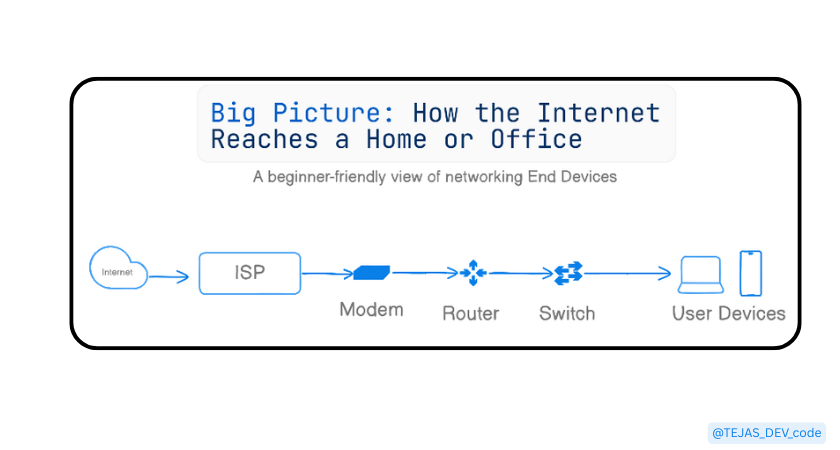
1. Big Picture: How the Internet Reaches a Home or Office
what the Internet Really
The Internet is Not a Wi-Fi or Cloud Floating in the sky.
The Internet is millions of Computers (servers) connected by Physical Cables spread across the world. Even under the sea, there are giant fiber-optic cables.
Step 1 : Global Internet Backbone
Big companies like google, amazon, microsoft and telecom giants are the backbone of the internet.
These are connected by high-speed fiber optic cables.
Step 2 : Internet Service Provider (ISP)
We cannot directly connect to the Global Internet that’s why we have to use the ISP.
e.g Jio, Airtel, BSNL, VI
ISP buys internet from the global internet and distributes it to home and offices then assigns them IP addresses and manage the traffic.
Step 3 : ISP Infrastructure
ISP has regional data centers, local exchange offices, fiber running through cities.
Internet travels like this :
Global Backbone → ISP → City.
Step 4 : Last-Mile Connection
It is the final connection from ISP to your building.
Quality of this cable affects your speed a lot.
Types of Last-Mile connections :
Fiber
Coaxial
Wireless (4G, 5G)
Step 5 : Modem
Internet coming from the ISP is not directly usable by your devices so we have to use the Modem.
It convert the ISP signal to the digital data.
It is like a language translator of the internet.
Step 6 : Router
It will create the local area network (LAN) then assigns private IP to device after this sends data to the correct device and also acts as a firewall.
This data is for Laptop, not the TV.
Step 7 : Switch / Access Point
In home, Router often includes the Wi-Fi + Switch.
In offices, Separate switches and access points, many wired devices.
Switch connect multiple devices and extend network reach.
Step 8 : Your device
Your laptop, phone gets private IP address , internet access via router and uses protocols like HTTP/HTTPS .
Now finally “You’re Online!”
2. Modem: Your Gateway to the Internet
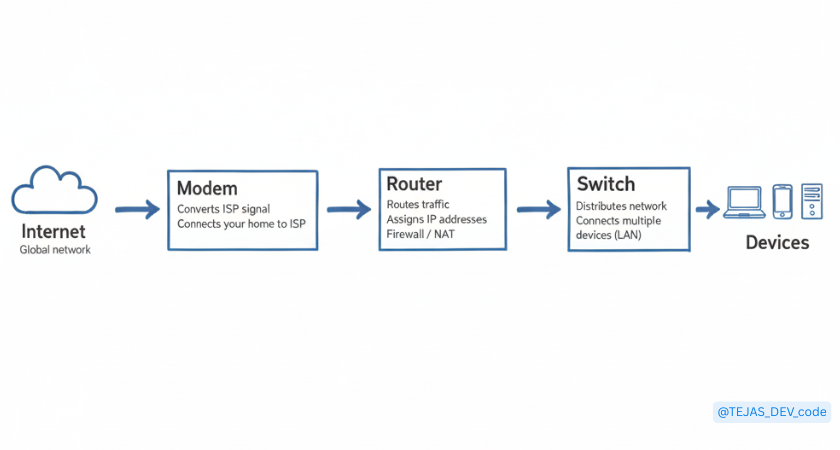
Modem connect your home, office to your ISP.
Core responsibility:
- convert ISP signals into digital data your network can use
This is why it is called MO-DEM:
MO = Modulator
DEM = Demodulator
Basically Modem = Translator
Key beginner points:
Help you to connect to ISP
ISP signals are Electrical, Light signals. Radio signals convert this because you device only understand (0s and 1s)
3. Router: Traffic Controller of Your Network
A router connects all your devices and shares the internet among them.
If modem brings internet inside and router distributes and manages it.
Core responsibility:
- Send the right data to the right device and bring data back correctly
e.g You open YouTube, your Brother opens WhatsApp and TV streams the Netflix here router makes sure your YouTube go to you phone, message go to your Brother WhatsApp and Netflix goes to TV. No mix-up.
Router = traffic controller
Key beginner points:
creates your local network (LAN)
connects many devices at once
give private IP addresses to devices
forwards requests to the modem
provides basic security
4. Switch vs Hub: How Local Networks Actually Work
what is Local Network (LAN) ?
A group of devices connected inside a home, office.
To connect many devices using cables we use : Hub or Switch
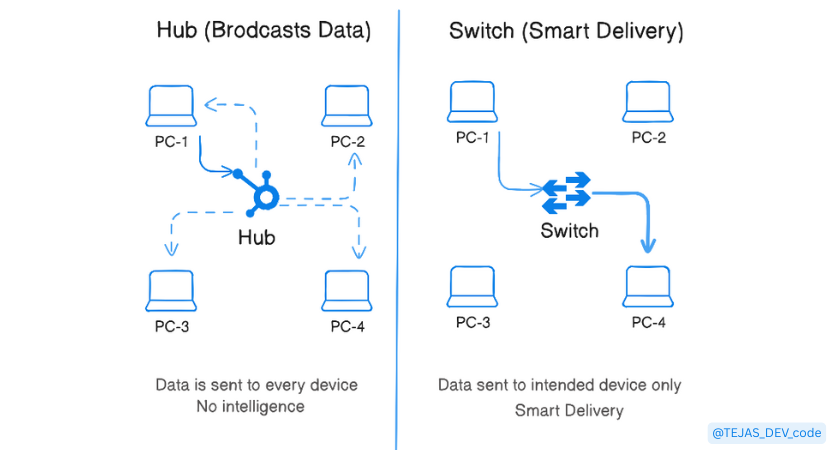
Hub :
Hub sends data to all connected devices
e.g one device sends data then hub copies it and sends it to the everyone.
Note : Everyone receives the data, even if it’s not for them.
Problems with Hub:
very slow
no security
data collision
e.g You talking to your friend on phone and speaker of phone is on then everyone hears it.
Switch :
Switch sends data only to the correct device.
Sends data only to the intended device
Faster and secure
data collision does not happen.
5. Firewall: Where Security Lives
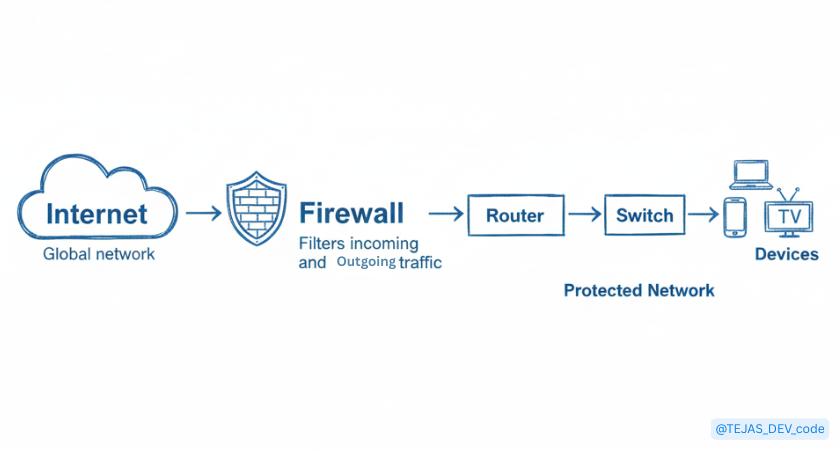
Firewall is a security guard that decides what network traffic is allowed and what is blocked.
Firewall protects your devices, network and data.
In a home or office router already has a firewall built in.
in companies or servers has dedicated firewall devices, software firewalls on servers.
Core responsibility:
allow safe traffic and block unwanted traffic.
it looks at source IP, destination IP, port number, connection state.
Key beginner points:
it lives mainly in router.
blocks unwanted traffic.
protects all connected devices.
Basically, Firewall = security guard
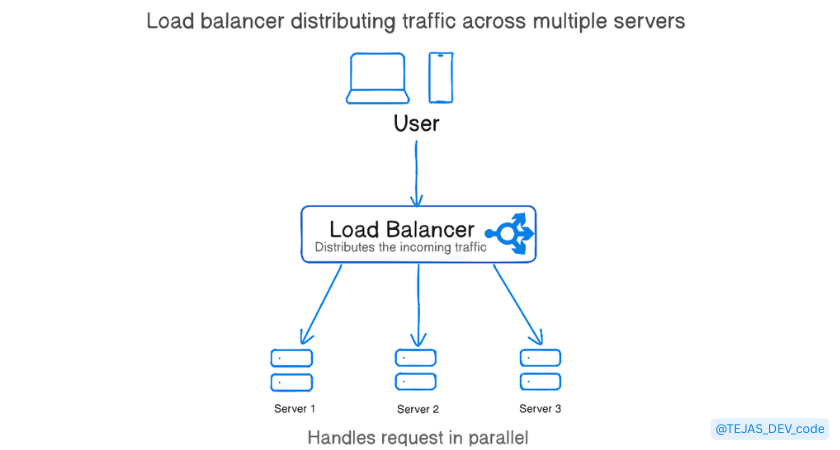
6. Load Balancer: Handling Scale
It distributes incoming traffic across multiple servers.
Core responsibility:
Sends user request to the right server so systems stay fast.
Detect the Unhealthy servers.
Key beginner points:
Used in large systems
protects servers from overload
e.g In Restaurants customers are users, load balancer are waiter and servers are chef’s => waiter sends orders to available chef’s, not one busy chef.
7. How All These Devices Work Together (Real-World Setup)
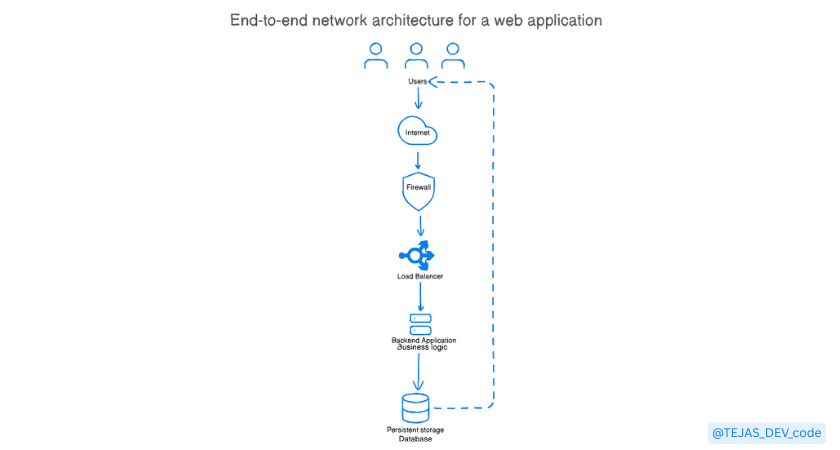
Step 1 : User makes a Request
User opens a browser
sends request like i want google homepage
now this request is ready to travel.
Step 2 : Request goes through the Internet
Request travels over ISP networks.
packets move fast across the world.
Internet is just the road system.
Step 3 : Firewall checks the request
Request reaches the company’s network
Firewall check is this traffic allowed, is this port valid and is it suspicious.
If everything is fine then only traffic passes.
Step 4 : Load balancer receives the request
firewall passes request to load balancer
load balancer check which backend server is free and healthy then sends request to that backend server.
prevents the server overload.
Step 5 : Backend server processes the request
- server runs application code, validates request and decides what data is needed
If data is needed then database is contacted.
Step 6 : Database Accessed
Backend server queries database
It returns requested data.
Database never exposed directly to users.
Step 7 : Response travels back
Backend server prepares response
Response flows back:
Database → Backend server → Load Balancer → Firewall → Internet → User.
Step 8 : User sees the result
Browser receives response
now you sees the google homepage.
Request-response cycle complete.
9. Why Software Engineers Should Care
Every API request travels through network devices
Your code runs after router, firewall, load balancer, and internet.Firewalls affect deployments
Closed ports, blocked IPs, or rules can break a “working” backend.Load balancers affect scaling
Wrong configuration can cause slow APIs, uneven traffic, or crashes.Networking bugs ≠ code bugs
Timeouts, CORS errors, 502/504 errors are often network issues.
“Many production issues are network issues, not code issues.”
10. Final Thoughts
Network devices usually stay invisible, quietly doing their job but they are critical to everything your code does in the real world.
When you understand how data flows through networks, you don’t just write code you build reliable systems.
And always remember:
Code never runs in isolation.
It runs on networks.
That awareness alone already makes you a better engineer.