

Understanding Object-Oriented Programming in JavaScript
What is Object-Oriented Programming (OOP)?
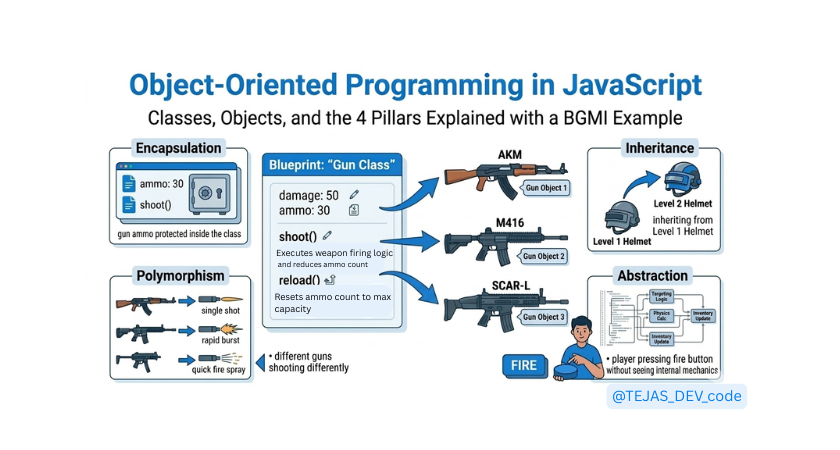
Imagine you are playing BGMI. In the game there are many objects:
• Player
• Gun
• Vehicle
• Backpack
Each object has properties (data) and actions (behavior).
A gun has:
• damage
• ammo
• range
And it can perform actions like:
• shoot
• reload
Object-Oriented Programming works the same way in code.
What Object-Oriented Programming (OOP) Means
OOP is a way of writing code by organizing things like real-world objects.
Each object has properties (data) and methods (actions).
For example in BGMI, a gun has properties like damage and ammo, and actions like shooting or reloading.
Instead of writing scattered functions, we model real-world entities like guns, players, helmets, and vehicles.
Real-World Analogy (Blueprint -> Objects)
Think of a blueprint used to build many houses.
The blueprint defines the structure, but the actual houses are the real objects.
In BGMI, the gun design is the blueprint, while AKM, M416, and SCAR-L are actual guns created from it.
In programming, the blueprint is called a class, and the real things created from it are called objects.
What is Class in JavaScript
A class is like a template or blueprint used to create objects. It defines what properties and methods every object will have.
For example, a Gun class might define damage, ammo, and shoot().
Different guns in BGMI can be created from the same class.
class Gun {
  constructor() {
    this.damage = 30;
    this.ammo = 20;
  }
}
Creating Objects Using Classes
An object is a real instance created from a class. If Gun is the blueprint, then AKM or M416 are objects.
Each object can have different values but follow the same structure. In JavaScript, we create objects from a class using the new keyword.
let akm = new Gun();
let m416 = new Gun();
Constructor Method
A constructor runs automatically when an object is created. It is used to set initial values for properties.
For example, when creating a gun we can set damage, ammo, and gun name. Every time a new gun object is made, the constructor assigns its starting stats.
class Gun {
  constructor(name, damage) {
    this.name = name;
    this.damage = damage;
  }
}
The constructor method runs automatically whenever we create a new object using new.
const akm = new Gun("AKM", 47);
Methods Inside a Class
Methods are functions defined inside a class that describe what an object can do. In BGMI, a gun can shoot(), reload(), or attachScope().
These actions are written as methods in the class. All gun objects created from the class can use those methods.
class Gun {
  shoot() {
    console.log("Gun is firing!");
  }
}
Pillars of OOP
Encapsulation
Encapsulation means keeping data and the methods that change that data inside one class.
It also protects important values from being changed directly from outside.
In BGMI, a gun’s ammo should not be changed randomly; it should only change when reload() or shoot() is called.
class Gun {
  constructor(ammo) {
    this.ammo = ammo;
  }

  shoot() {
    if (this.ammo > 0) {
      this.ammo--;
      console.log("Bang! Ammo left:", this.ammo);
    }
  }
}

const akm = new Gun(30);
akm.shoot();
Inheritance
Inheritance means a class can use properties and methods from another class.
This helps reuse code instead of writing it again.
In BGMI, Level 2 Helmet can inherit features from Level 1 Helmet and just add more protection.
class Helmet {
  constructor(level) {
    this.level = level;
  }

  protect() {
    console.log("Helmet level:", this.level);
  }
}

class Level2Helmet extends Helmet {
  constructor() {
    super(2);
  }
}

const helmet = new Level2Helmet();
helmet.protect();
Level2Helmet inherits the protect() method from Helmet, so we don't need to rewrite it again.
Polymorphism
Polymorphism means same method name but different behavior in different classes.
Different objects respond to the same action in their own way.
In BGMI, all guns have a shoot() method, but AKM and M416 shoot differently.
class Gun {
  shoot() {
    console.log("Gun is shooting");
  }
}

class AKM extends Gun {
  shoot() {
    console.log("AKM: High damage single fire");
  }
}

class SMG extends Gun {
  shoot() {
    console.log("SMG: Fast automatic fire");
  }
}

const gun1 = new AKM();
const gun2 = new SMG();

gun1.shoot();
gun2.shoot();
Both objects respond to the same shoot() method, but each class implements it differently.
Abstraction
Abstraction means hiding complex details and showing only important actions.
The user only interacts with simple functions without seeing internal logic.
In BGMI, players press fire, but they don’t see bullet physics, recoil calculations, etc.
class Player {
  fireGun() {
    this.#calculateRecoil();
    console.log("Player fired the gun");
  }

  #calculateRecoil() {
    console.log("Recoil calculated internally");
  }
}

const player = new Player();
player.fireGun();
The user interacts with simple actions while the complex logic stays hidden inside the class.
Why OOP Is Important in Real Applications
OOP helps developers:
• organize code better
• reuse logic
• manage large projects
• model real-world systems
Most large applications and frameworks use OOP concepts to keep code maintainable.
Practice Challenge
Create a Class
Create a class called Student.
The class should store two properties:
nameage
Use the constructor to set these values when a new student object is created.
Example structure:
class Student {
  constructor(name, age) {
    this.name = name;
    this.age = age;
  }
}
Add a Method
Add a method inside the class called introduce().
This method should print the student’s details.
Example behavior:
Hello, my name is Tejas and I am 20 years old
Example idea:
introduce() {
  console.log("Hello, my name is " + this.name + " and I am " + this.age + " years old");
}
Create Multiple Student Objects
Now create multiple students using the Student class.
Example:
const student1 = new Student("Tejas", 20);
const student2 = new Student("Virat", 22);
Call the Method
Call the introduce() method for each student.
Expected output:
Hello, my name is Tejas and I am 20 years old
Hello, my name is Virat and I am 22 years old
Try adding more students to see how the same class can create many objects easily.
Final Thoughts
Object-Oriented Programming helps developers structure programs in a way that mirrors real-world systems.
By organizing code into classes and objects, we can build applications that are easier to understand, reuse, and maintain.
Concepts like encapsulation, inheritance, polymorphism, and abstraction form the foundation of OOP and are widely used in modern JavaScript applications.
Understanding these ideas is an important step toward writing scalable and professional code.